States Visited Map
Mark the US states you've been to, or generate the map from your photos or Google Timeline. Free, no signup, nothing leaves your device — not even map tiles.
Tap a state to mark it · scroll or pinch to zoom · drag to pan
Map: U.S. Census Bureau via us-atlas (public domain), bundled with this page — no map provider is contacted.
Your image
0of 50 · 0% of the USA
This is exactly what you download. Change the size, style or title and it updates.
Size
Style
Colours
Count
Image
Link
A short link stores this map (states, title, colours) on our server so it can redirect — never your photos or files.
Share link
Try an example map
See what a finished map looks like, then replace the states with your own.
How to make a states visited map
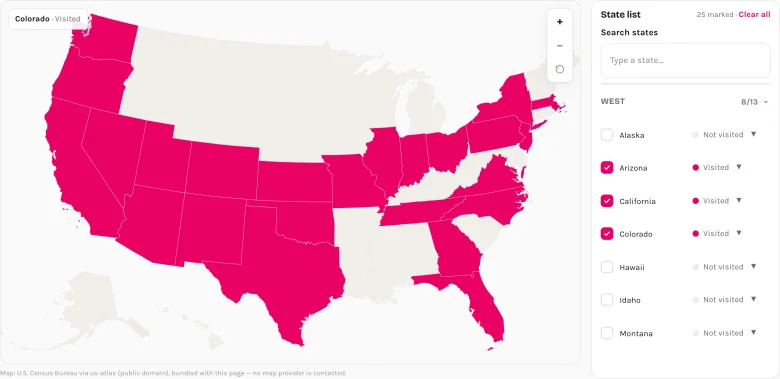
1. Mark the states
Tap states on the map or tick them in the list. Set a state to "Lived" or "Want to go" for a second colour. No account, nothing to install.
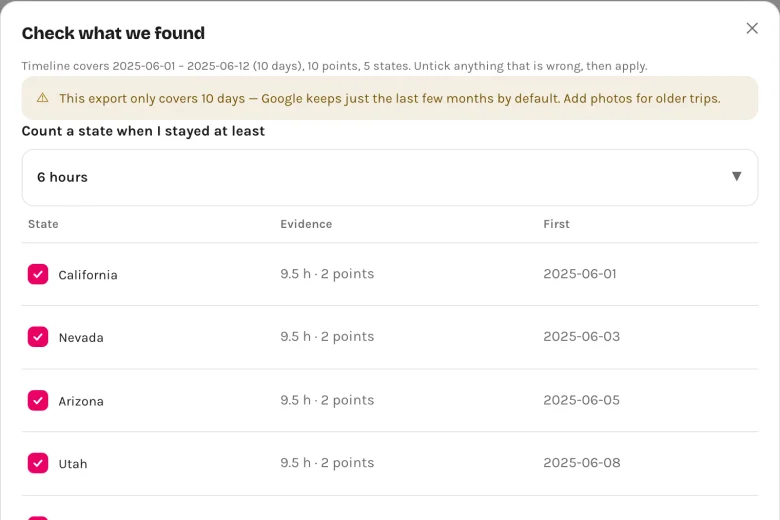
2. Or let your photos / Timeline fill it in
Pick your travel photos (a whole folder on a computer) or drop your Google Maps Timeline export. Your browser reads the locations and shows you a list to confirm — untick anything that is wrong.
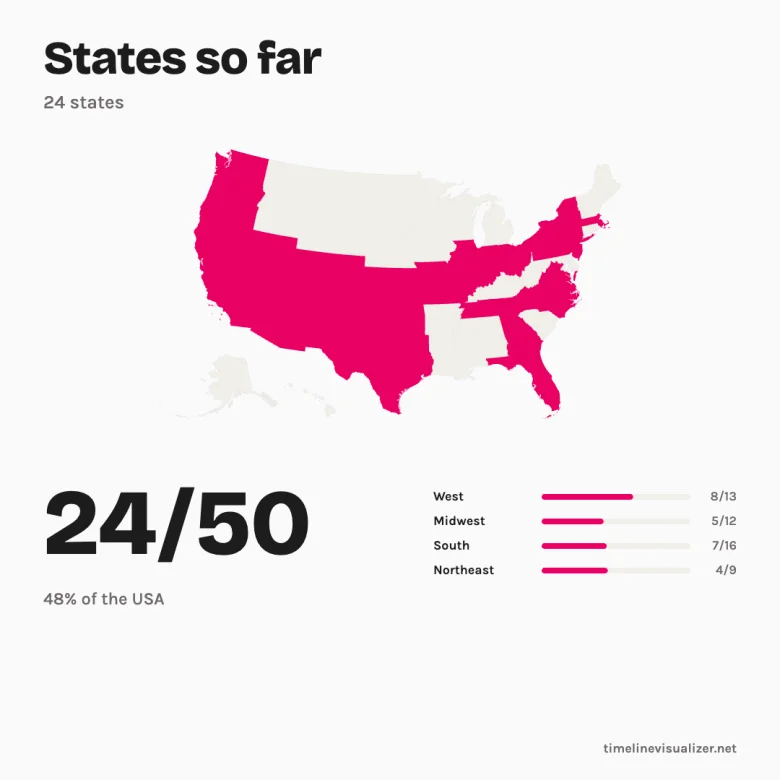
3. Download and share
Pick a size — square for Instagram, story for Reels, wide for a blog — and download the PNG. Copy the link to save the map or update it later.
Why use this free map maker
From your photos
Every photo taken with a phone or camera carries a location. Pick a folder and the map fills itself — with the year of your first visit to each state.
From Google Timeline
The same file our travel-video tool uses. States are counted by how long you stayed, so a highway drive-through doesn't have to count — you decide in the confirmation list.
Nothing leaves your device
Photos and Timeline files are read in your browser. The map itself is bundled with the page, so not even a map provider hears from you.
Free, no watermark
Four sizes, two styles, the signature is optional. Pro only adds 2× resolution and the year-by-year block.
The link is the save
Your whole map is encoded in the URL — bookmark it, come back after the next road trip and add a state. Need something shorter for a bio or a chat? One press makes a 6-character short link.
Embed it on your blog
One iframe tag puts a read-only copy of your map on your About page or travel blog. Update the link, and the embed updates — no plugin, no script.
50, 51 or everything
Count the 50 states, add DC, or include Puerto Rico, Guam and the other territories. Your percentage follows.
How many states are in each region?
The denominators this tool uses, for the 50-state scope, grouped by the Census Bureau's four regions. Switch scopes above and the bars follow.
| Region | States | Examples |
|---|---|---|
| West | 13 | California, Colorado, Washington |
| Midwest | 12 | Illinois, Ohio |
| South | 17 | Florida, Georgia, Texas |
| Northeast | 9 | Massachusetts, New York |
| Total | 51 |
Questions
- Can it generate the map for me?
- Yes — drop your photos or a Google Timeline export and it works as a states visited map generator: your states fill in automatically, each with the year of your first visit, and you confirm the list before anything touches the map.
- Can I use it as a 50 states checklist?
- That's exactly what the state list is — tick the states you've been to, search to jump to one, and watch the count climb toward 50. The map and the checklist stay in sync either way you work.
- What counts as visiting a state?
- Whatever you say it does — this is your map. When we generate it from your Timeline we count a state once you spent at least 6 hours there (you can change that to 1 or 24 hours, or override any state). From photos, any geotagged photo counts.
- Do airport layovers or drive-throughs count?
- Up to you. Short stops usually stay under the 6-hour rule, so the Timeline import leaves them out; tick them in the confirmation list if you want them.
- 50 or 51 — does DC count? What about Puerto Rico?
- The classic count is the 50 states. Switch the scope to add the District of Columbia (51), or include Puerto Rico, Guam, the U.S. Virgin Islands, American Samoa and the Northern Mariana Islands. Island territories are listed but not drawn on the map projection.
- Is anything uploaded?
- No. Your photos and Timeline file are read in your browser and never sent anywhere. This page even ships its own map, so it makes no request to a map provider — open the Network tab in DevTools and check.
- Can it read my photos or Google Timeline?
- Yes. Photos: pick them (or a whole folder on a computer) and we read only the GPS and date stored inside each file. Timeline: export it from Google Maps (see the guide) and drop the JSON here. Even a few months of Timeline usually covers your recent road trips; photos reach further back.
- Can I embed the map on my website?
- Yes. Press "Embed" under the map to copy an iframe tag — paste it into any blog, About page or WordPress post (the Custom HTML block). It shows a read-only copy of your map with the count and a small credit line, and stays in sync with the link inside the tag.
- How do I save or share my map?
- Copy the link — the whole map is encoded in it, no account needed, and nothing is stored anywhere. If the link is too long for a bio or a chat, press "Short link": we then keep the map state (states, title, colours — never your photos or files) under a 6-character code on our server and redirect visitors to it. Your last map is also kept in this browser.
More free tools
Travel video from Google Timeline
Turn your Timeline export into an animated route video — free, rendered on your device.
Google Timeline Viewer
See your Google Maps Timeline on a computer — browse visits and routes day by day. Read in your browser, nothing uploaded.
Countries Visited Map
Mark the countries you have been to, or generate the map from your photos or Timeline. Free PNG, no watermark.
Photo Map
Drop your travel photos and see them on a map — read on your device, nothing uploaded. Export one beautiful image, free.